

In the contemporary Background Removal e-commerce landscape, visual assets play a primary role in building consumer trust. Research from the Baymard Institute confirms that product image quality is one of the most important factors influencing purchase decisions. Since shoppers cannot physically interact with products, digital images must act as high-fidelity representations that accurately showcase a product’s features and quality.
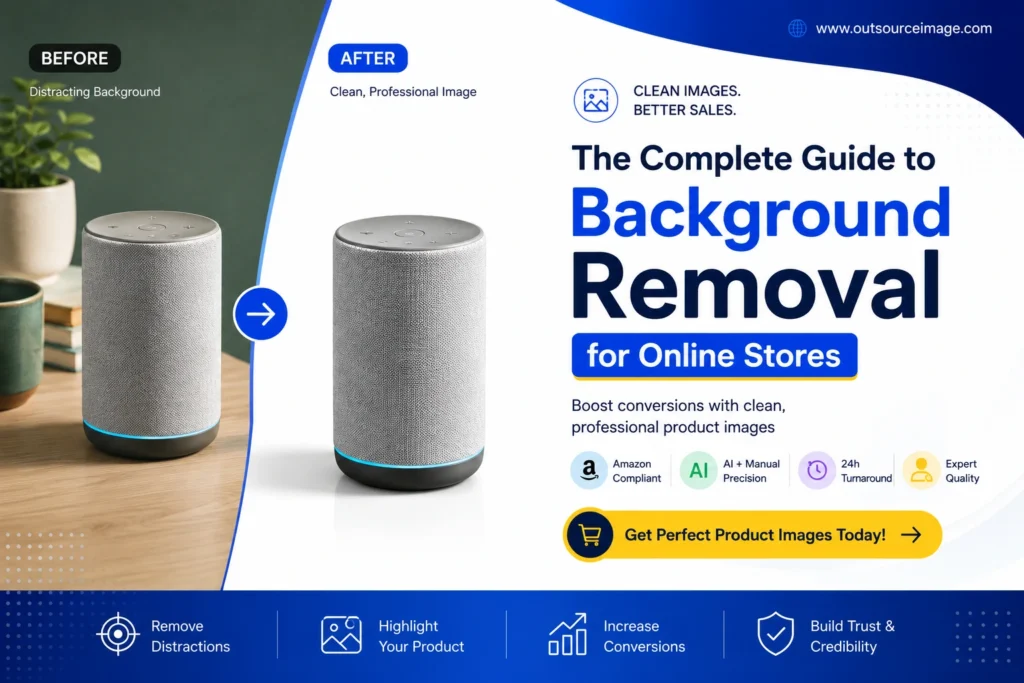
As a result, professional background removal has become an essential part of e-commerce image editing. Clean, distraction-free product photos help customers focus on the product itself while creating a more polished and trustworthy shopping experience.
Against this backdrop, this guide provides a comprehensive overview of background removal for online stores—a fundamental aspect of professional product presentation that directly impacts conversion rates, marketplace compliance, and brand credibility.
The Strategic Importance of Clean Backgrounds
1. Driving Conversion and Trust -Background Removal
The “Professional Presentation Bias” suggests that consumers tend to associate clean and consistent imagery with higher seller trustworthiness. Research indicates that product images with pure white backgrounds can convert 20% to 30% better than those with cluttered or inconsistent environments. As a result, eliminating visual distractions reduces the shopper’s cognitive load, allowing them to focus more clearly on the product’s shape, color, texture, and key features.
2. Marketplace Compliance: The Amazon Standard
Major marketplaces enforce strict technical standards for primary product images to ensure a consistent and uniform customer experience.
Amazon: Requires a pure white background (RGB 255, 255, 255). The product must occupy at least 85% of the frame, and images must be free from text, watermarks, or distracting props.
Walmart & eBay: Similarly require—or strongly recommend—white backgrounds for primary listing images to prevent listing suppression, where non-compliant products may be hidden from search results.
Google Shopping: Actively penalizes or suppresses listings that feature cluttered backgrounds or non-white primary images.
Manual Techniques vs. AI Automation:
The 2026 Landscape – Background Removal
The Precision of Manual Editing -Background Removal
Manual background removal remains the baseline for high-quality results. In Adobe Photoshop, the Pen Tool is widely considered the industry standard for creating precise vector paths around products with well-defined edges, such as electronics or packaged goods. While highly accurate, this method is labor-intensive and often requires 15 to 30 minutes per image.
In contrast, techniques such as Channel Masking are used for more intricate details like lace or jewelry, where contrast-based selection performs better than geometric path creation.
The AI Efficiency Revolution – Background Removal
By 2026, AI deep learning models have significantly reduced the editing timeline from minutes to seconds. Modern AI tools utilize semantic segmentation to classify pixels as either “product” or “background” with sub-pixel accuracy. As a result, these models can now handle complex edges—such as hair, fur, and semi-transparent materials—with a level of precision that previously required highly skilled professional retouchers.
The Economics of Production – Background Removal
For a store with 500 SKUs, manual editing can consume over 100 hours of professional work.
In-house editing: Costs typically range from $3 to $8 per image when factoring in salaries, software subscriptions, and hardware overhead.
AI solutions: Can reduce marginal costs to approximately $0.10 to $1.00 per image, although they often still require human QA for the final 5% of edge refinement.
Mastering Challenging Materials: Glass, Transparency, and Texture Background Removal
The Transparency Paradox -Background Removal
Transparent objects such as glass and plastic are particularly challenging because they naturally capture and reflect the light and colors of their surroundings.
- Best Practice: Use backlighting and diffusion during photography to create a “glow” around the edges, which helps AI tools distinguish the product from the backdrop.
- Refinement: Avoid making transparent areas “solid.” Keeping subtle refractions and soft highlights ensures the product looks like real glass rather than a cheap digital render.
Managing Complex Edges (Hair, Fur, and Fabric)
For apparel or pet products, “Select and Mask” workspaces in professional suites are essential. Tools like the Refine Edge Brush are used to paint over fine strands, while “Decontaminate Colors” removes the color fringe reflected from the original background.
Operational Excellence: Building an Image Pipeline – Background Removal
Step 1: Optimized Photography
The most efficient background removal process begins in the studio. Using a white sweep (a curved backdrop) eliminates horizon lines and provides the clearest separation for AI models. Lighting the background separately from the product creates a high-contrast boundary, which reduces the need for manual edge cleanup later.
Step 2: Batch Processing and Chaining
For high-volume stores, processing images one by one quickly becomes a bottleneck. High-performance pipelines chain multiple operations into a single workflow, including:
- Automated background removal
- Standardizing aspect ratios and padding (to center the product)
- Generating consistent contact shadows to prevent a “floating” appearance
- Upscaling image resolution to enable zoom functionality
Step 3: Strategic Outsourcing with Outsourceimage
As volume grows, many brands face a scaling challenge. Maintaining an internal team often leads to hidden costs in management, training, and hardware. Outsourceimage provides an enterprise-grade solution that bridges the gap between raw AI speed and human precision.
By integrating Outsourceimage into your workflow, you can reduce the overhead associated with in-house staffing while gaining access to specialized retouchers who expertly handle complex categories such as jewelry, ghost mannequins, and luxury glass products—often with a 24-hour turnaround time.
The Professional Quality Assurance (QA) Checklist
Before any image is uploaded to your online store, it must pass a rigorous QA check:
- Edge Halos: Zoom to 200% to ensure there are no white or dark fringes around the product boundary.
- Missing Details: Verify that thin straps, tags, or fine product textures haven’t been incorrectly classified as background.
- Shadow Consistency: Ensure all shadows in your catalog fall in the same direction with uniform opacity to maintain a cohesive “boutique” feel.
- Background Purity: Use an eyedropper tool to confirm the background is a true RGB 255, 255, 255; slight off-white tones can appear “dirty” on marketplace listings.
Conclusion: Investing in Visual Assets
Background removal is not merely a technical task; it is an investment in your store’s conversion rate and brand reputation. While AI tools offer unprecedented speed, the most successful online stores in 2026 adopt a hybrid approach—leveraging AI for baseline efficiency and partnering with experts like Outsourceimage for high-volume, high-precision scaling.
By following this comprehensive guide, you can ensure that every product image delivers impact, helping to drive sales and reduce returns through strong visual presentation.
Frequently Asked Questions: How Outsourceimage Solves Your Background Challenges
1. How does Outsourceimage handle products that AI tools usually struggle with, such as transparent glass or lace?
Standard AI tools often produce “broken” reflections or “plastic-like” edges on transparent objects. Outsourceimage uses expert retouchers. who manually refine masks and restore internal refractions, ensuring that glassware and intricate fabrics look natural, realistic, and high-end rather than appearing “cut out with scissors.”
2. We need to list 1,000+ products for a seasonal launch. Can Outsourceimage help us avoid a bottleneck?
Yes. Scaling an in-house team for seasonal demand spikes is both expensive and time-consuming. Outsourceimage is designed for bulk e-commerce processing, offering overnight turnaround for large catalogs, enabling teams to move from unboxing to live listings on the same day.
3. Does Outsourceimage guarantee compliance with Amazon and Walmart image standards?
Absolutely. Outsourceimage follows strict Amazon image standards, delivering pure white backgrounds (RGB 255, 255, 255), 85% frame fill, and proper padding. This helps ensure your listings remain compliant and are not suppressed due to image violations.
4. What is the benefit of using Outsourceimage over a free AI background remover?
Free tools often limit resolution, add watermarks, or lack advanced shadow control. Outsourceimage provides full-resolution, print-ready outputs with professionally designed contact shadows that add depth, making products appear grounded and visually premium.
5. How does Outsourceimage help reduce the “hidden costs” of photo editing?
Managing an in-house editing team involves hidden expenses such as salaries, paid leave, software licenses, and management overhead. By outsourcing to Outsourceimage, you convert these fixed costs into a flexible, per-image model, allowing you to scale efficiently without increasing operational burden.
“A clean background puts the focus where it belongs—on your product.”
[ Get a Free Quote ]
Email: sales@outsourceimage.com
Website: www.outsourceimage.com