
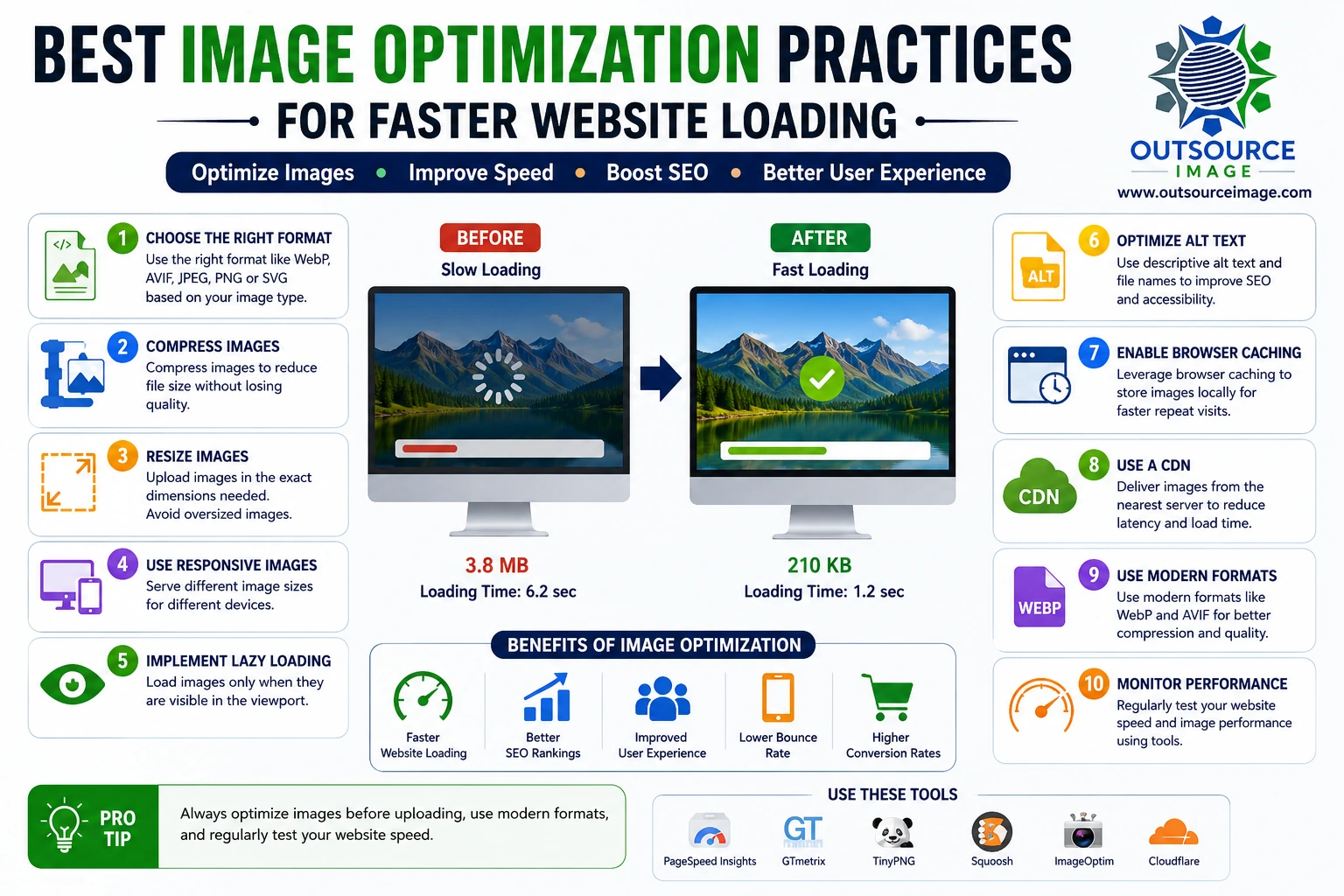
The median website is now heavier than ever. According to HTTP Archive’s 2025 Web Almanac, the typical home page weighs 2.9 MB on desktop and 2.6 MB on mobile. Crucially, images remain the single largest contributor to this weight.[^1] In 2026, optimizing images requires more than just running a basic compressor. Instead, you must choose the right format, serve the right size to the right device, and start from a clean, well-edited photo in the first place. Consequently, a poorly shot or unretouched image costs you precious bytes before optimization even begins. That is exactly why professional photo editing and image optimization function as two halves of the same job.
Why This Still Matters for Business -Image Optimization
The relationship between page speed and revenue hasn’t loosened at all. For instance, conversion-rate research consistently reveals that conversions drop several percentage points for every additional second of load time in the 0–5 second range.[^2] Furthermore, Pingdom’s benchmarking discovered that bounce rates roughly triple when a page load stretches from 1 second to 5 seconds.[^2]
In addition, images directly shape two of Google’s three Core Web Vitals:
- Largest Contentful Paint (LCP) — This metric usually measures the largest image on your page. A “good” LCP takes 2.5 seconds or under, yet HTTP Archive’s 2025 data shows that many sites still miss that bar.[^3]
- Cumulative Layout Shift (CLS) — Browsers often experience this shift because they load images without reserved space.
Moreover, mobile environments make all of this more urgent. Because real-world mobile conditions vary widely, an unoptimized image gallery can easily tank performance on a phone, even if it runs smoothly on a wired desktop connection.
This is also where image editing services matter far more than people expect. Specifically, a professional photo with clean backgrounds and consistent exposure compresses more predictably than a cluttered, noisy original. Therefore, the business case for speed starts with the quality of your source image, not just the file format you choose afterward.
1. Pick the Right Format First -Image Optimization
- AVIF — This format typically saves 20–40% more space than WebP at comparable quality, especially for photos.[^4] Because global browser support now sits in the low-to-mid 90s, you can safely deploy it as a primary format with a fallback.
- WebP — This remains a strong default choices where AVIF encoding isn’t practical, especially since browsers have supported it near-universally for years.
- JPEG/PNG — Developers now use these mainly as fallback formats.
- SVG — This is always the right call for icons and logos.
As a rule of thumb, you should compress your files until you can just barely see quality loss, then back off one notch. Additionally, match your format to your content type. While photos perfectly suit AVIF, flat graphics and screenshots often benefit more from PNG or lossless WebP. Remember, a well-retouched photo—the kind produced by a professional photo editing service like Outsource Image—always compresses more predictably than a noisy original, regardless of the format you select.
2. Serve the Right Image to the Right Device -Image Optimization
Sending a full desktop-resolution image to a mobile phone is one of the most wasteful mistakes you can make. However, you can use resolution switching to let the browser load a smaller version on mobile and reserve the full version for desktop, all from the same source photo. If you need a genuinely different crop—such as portrait for mobile and landscape for desktop—the browser can pick between entirely different image files. Fortunately, real estate and product photo editing services routinely deliver pre-cropped variants for exactly this reason, ensuring you have the right crop ready before it ever reaches your site.
3. Get Loading Priority Right -Image Optimization
Lazy loading serves as a great baseline practice, but it hurts your site if you apply it to the hero image, which directly delays your LCP.
| Image type | What to do | Why |
| Hero / above-the-fold | Load immediately with top priority | It directly determines what LCP measures |
| Below-the-fold | Delay until the user scrolls near | It saves valuable user bandwidth |
| Embedded video thumbnails | Use a static image until clicked | It avoids loading a heavy video player early |
For a quick check, open your homepage and note the very first image a visitor sees without scrolling. You should never delay that specific image.
4. Reserve Space Before the Image Loads
Layout shifts come down to one simple problem: the browser did not know the image’s dimensions ahead of time. Therefore, you should always declare the width and height (or aspect ratio) up front. Well-edited images with consistent, known dimensions make this far easier to standardize across a whole site. This consistency is a hallmark of professional product photo editing, where specialists crop every single image in a catalog to the exact same ratio.
5. Automate It
Manual optimization simply doesn’t scale past a handful of pages. Instead, you should build the following steps directly into your workflow:
- Generate modern-format variants automatically during uploads or rebuilds.
- Generate the exact size variants that each device needs.
- Strip non-essential metadata (such as EXIF and GPS data), which otherwise adds unnecessary weight to your files.
While automation handles technical optimization, it cannot fix editing quality. For that reason, pairing your automation pipeline with a proper image retouching service like Outsource Image ensures that your photos are already well-composed and consistent before compression even starts.
6. What’s Newer in 2026
- AI-readable images — Accurate, descriptive alt text helps AI-driven search and shopping assistants understand your content. Consequently, clean, well-labeled product photography from a retouching service makes it easier to do this consistently across a large catalog.
- Sustainability — Smaller page weights mean networks transmit less data. Ultimately, this provides a modest but real energy consideration at scale.
- Secure processing — You should use sandbox transformations for user-uploaded images, because malicious actors can use image files to smuggle dangerous payloads.
7. Measure It
- Lab testing — Tools like Lighthouse or WebPageTest clearly expose your LCP element and highlight any layout shifts.
- Field data — Real-user monitoring tools show you actual device performance in the wild.
- Regression checks in CI — A strict performance budget will catch an oversized image before it reaches production. However, keep in mind that no automated CI check catches a badly composed photo. That remains a photo editing problem, which you must solve upstream.
Start With a Clean Source Image
Noisy, poorly cropped, or unretouched source photos compress poorly because visual clutter and grain force the codec to work harder. This is where Outsource Image fits into your workflow. As a professional photo editing and image retouching service, they handle the visual side before your technical optimization even starts. Their core services include:
- Real estate photo editing and HDR blending
- Product photo editing services and background removal for e-commerce
- Portrait, fashion, and jewelry retouching
- Wedding and automotive photo editing
Conclusion
None of these strategies are exotic. On the contrary, they represent the disciplined execution of tools that the web platform already supports well: modern formats, responsive delivery, correct loading priority, and reserved layout space. But technical optimization can only do so much with the files you give it. Because a cluttered or poorly shot source image will always weigh more than a clean one, pairing a professional image editing service like Outsource Image with these practices is what truly makes a site feel lightning-fast. The editing gets the photo right, and the optimization gets it to the browser efficiently.
Get in touch:
- Website: outsourceimage.com
- Email: sales@outsourceimage.com
- Phone: +91 9345450713