
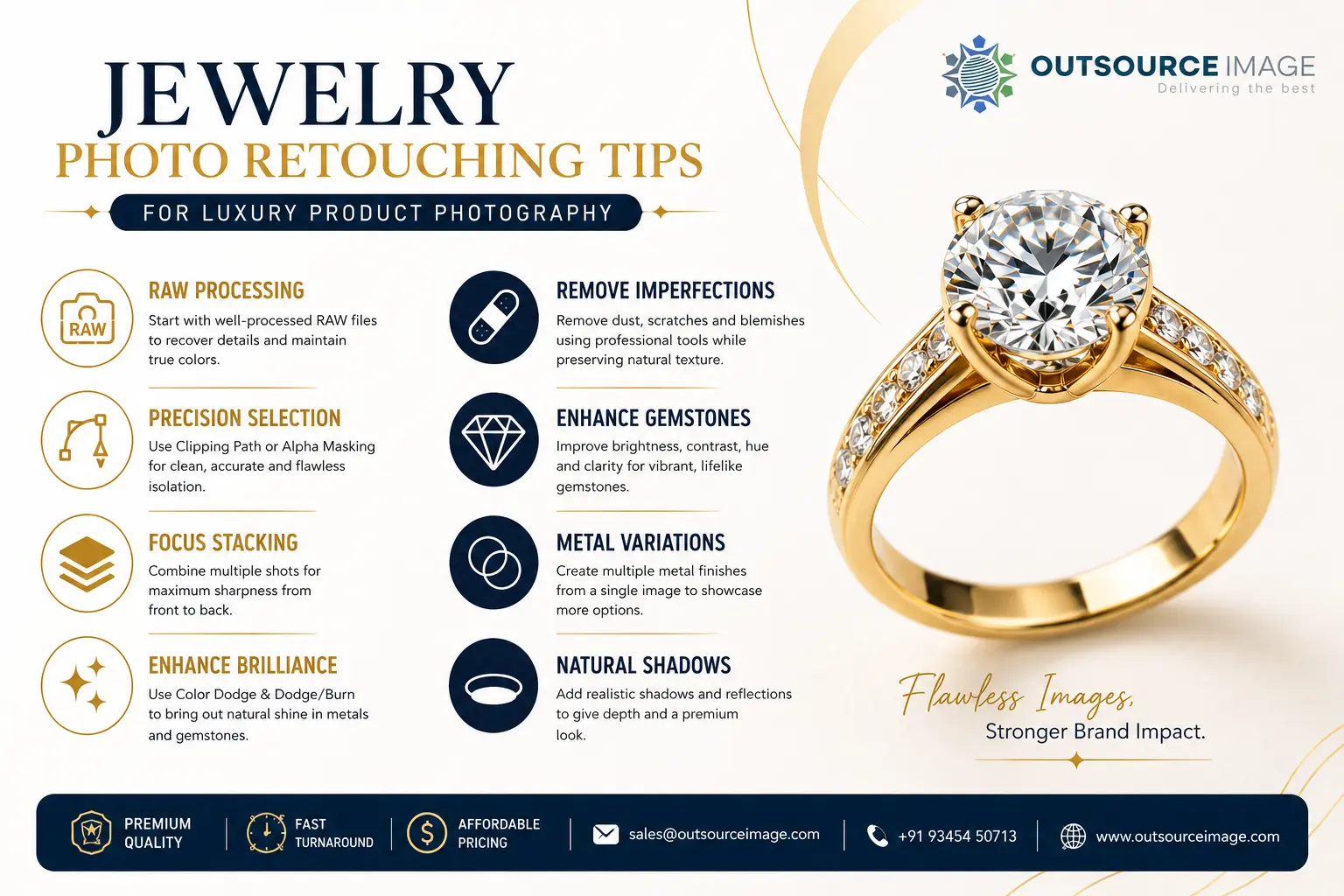
In luxury eCommerce, customers cannot touch, wear, or inspect jewelry before making a purchase. Instead, your product images become your most powerful salesperson — which is exactly why these jewelry photo retouching tips matter so much. Therefore, every photograph must communicate quality, craftsmanship, and trust within seconds.
In fact, professional jewelry photo retouching transforms ordinary product photos into premium commercial visuals that highlight the brilliance of gemstones, the shine of precious metals, and the intricate craftsmanship of every piece. Because luxury jewelry represents a significant investment, every image must be flawless and, above all, must accurately reflect the product’s true beauty.
For example, whether you’re selling through Shopify, Amazon, Etsy, your own eCommerce store, or a luxury jewelry catalog, professionally retouched images can improve customer confidence, strengthen your brand identity, and ultimately increase conversion rates.
So, in this guide, we’ll explore the essential jewelry photo retouching techniques used by professional editors to create high-end product images that, in turn, attract buyers and elevate luxury brands.
1. Jewelry Photo Retouching tips Starts with High Quality RAW Files
To begin with, exceptional jewelry retouching begins before Photoshop. First and foremost, professional editors always work with RAW files because they contain significantly more image information than JPEGs, thereby providing greater flexibility without sacrificing quality.
Specifically, processing RAW files allows editors to:
- Recover highlight and shadow detail
- Correct exposure and white balance
- Maintain accurate metal and gemstone colors
- Preserve maximum image quality during editing
As a result, a properly processed RAW image, in the end, creates the perfect foundation for premium jewelry retouching. If you’re just getting started, our photo editing services page explains how we handle RAW files at scale.
2. Use the Right Selection Technique – Jewelry Photo Retouching Tips
To start, accurate product isolation is one of the most important steps in professional jewelry photo retouching. After all, clean selections ensure every edit looks natural and polished.
Clipping Path
First, the Pen Tool is the preferred method for jewelry with clean, defined edges. Consequently, it produces precise, editable selections ideal for rings, necklaces, earrings, bracelets, pendants, and watches.
Alpha Masking
On the other hand, jewelry featuring intricate filigree, transparent gemstones, delicate chains, or fine details benefits from Alpha Masking instead. Indeed, this technique preserves complex edges that would otherwise be difficult to isolate using a clipping path alone.
Overall, then, choosing the correct selection method from the beginning improves editing accuracy and, ultimately, produces superior commercial-quality images.
3. Achieve Maximum Sharpness in Jewelry Photo Retouching with Focus Stacking
Often, macro photography creates a shallow depth of field, leaving only part of the jewelry in focus. To overcome this limitation, professional photographers use Focus Stacking (also called Z-Stacking or Focal Plane Merging).
In this process, specifically, multiple photographs taken at different focus distances are combined into one image with complete front-to-back sharpness.
As a result, the benefits include:
- Edge-to-edge sharpness
- Superior gemstone clarity
- Better metal texture
- Enhanced engraving visibility
- Higher overall image quality
Typically, focus stacking can be completed using Helicon Focus or, alternatively, Adobe Photoshop’s Auto-Align Layers and blending tools.
At Outsource Image, for example, focus stacking is therefore a standard part of our macro jewelry editing workflow, ensuring every product appears crisp, detailed, and ready for luxury catalogs.
4. Remove Dust, Scratches, and Surface Imperfections – Jewelry Photo Retouching Tips
Indeed, macro photography reveals tiny imperfections that customers never notice in person but that become highly visible in close-up product images. This is where careful jewelry photo retouching makes the difference — professional retouchers rely on industry-standard Photoshop tools to restore flawless surfaces.
Healing Brush Tool First of all, this tool is perfect for removing dust and fingerprints while preserving natural texture.
Clone Stamp Tool Meanwhile, this tool repairs scratches, dents, and damaged metal surfaces with complete precision.
Patch Tool In addition, this tool corrects larger imperfections while maintaining surrounding metal texture.
Spot Healing Brush Finally, this tool quickly removes small dust spots and surface blemishes.
Professional Tip: Rather than completely removing every tiny scratch, experienced retouchers instead, and quite deliberately, soften imperfections while preserving the authentic appearance of polished precious metals.
5. Enhance Brilliance, Sparkle, and Metal Shine
Even so, professional cameras cannot fully capture the brilliance of diamonds or the reflective qualities of polished gold, platinum, and silver. That’s why professional retouching restores the sparkle customers naturally expect.
Create Realistic Highlights with Color Dodge
Specifically, the Color Dodge blending mode is one of the industry’s most effective techniques for enhancing jewelry reflections.
The professional workflow, then, is as follows:
- Create a new layer using Color Dodge.
- Disable Transparency Shapes Layer.
- Paint highlights only where light naturally reflects.
Instead of pure white, professional retouchers typically use warm yellow highlights for gold and, likewise, cool off-white tones for silver and platinum, thereby creating realistic reflections without an artificial appearance.
6. Improve Gemstone Color and Clarity
Every gemstone, of course, deserves individual enhancement, and this step is central to any high-end jewelry photo retouching workflow. To achieve this, professional editors carefully adjust:
- Brightness
- Contrast
- Hue
- Saturation
- Facet definition
For instance, using the Dodge and Burn technique, editors enhance individual gemstone facets while, at the same time, maintaining natural depth and sparkle.
However, over-editing should always be avoided, since excessive dodging can, in turn, flatten detail and reduce realism.
7. Create Multiple Metal Variations from a Single Image
Often, luxury jewelry collections feature the same design in yellow gold, white gold, rose gold, platinum, and silver. Rather than photographing every variation separately, professional retouchers instead use Hue/Saturation adjustments with the Colorize option to create multiple realistic metal finishes from a single image.
As a result, this approach reduces photography costs, shortens production time, and, ultimately, ensures consistency across the entire product catalog.
8. Build Realistic Shadows and Reflections
Without properly constructed shadows, jewelry appears to float unnaturally. To prevent this, jewelry photo retouching creates depth using multiple shadow layers.
Contact Shadow First, a thin shadow directly beneath the jewelry anchors the product naturally to the surface.
Reflective Shadow Next, mirror-style reflections created with flipped layers, gradient masks, and blur effects, in addition, add elegance and realism.
Ambient Shadow Finally, soft shadows gradually fade outward, thereby accurately simulating natural studio lighting.
Together, then, these shadow layers create premium product images that appear realistic rather than digitally edited.
9. Perform a Professional Quality Inspection
Before delivery, every jewelry image undergoes a rigorous jewelry photo retouching quality control check. Specifically, professional editors zoom to 200–300% to inspect every gemstone, prong, engraving, edge, and metal surface for microscopic imperfections.
After that, moreover, final images are optimized by:
- Compressing files without visible quality loss
- Exporting in WebP, JPG, or PNG
- Using SEO-friendly filenames
- Matching marketplace image specifications
- Ensuring fast website loading speeds
Ultimately, therefore, this final review guarantees commercial-ready images suitable for luxury eCommerce platforms.
Why Choose Outsource Image for Jewelry Photo Retouching?
Luxury jewelry, above all, deserves flawless presentation.
To this end, at Outsource Image, we combine skilled retouchers, advanced Photoshop techniques, and rigorous quality control to produce commercial-ready jewelry images that meet the highest industry standards. Explore our jewelry retouching services or browse our portfolio to see recent work.
Whether you’re an independent jeweler, an online retailer, a jewelry manufacturer, or a global luxury brand, our experienced editors nevertheless deliver:
- Pixel-perfect clipping paths
- Expert focus stacking
- Realistic gemstone enhancement
- Natural metal shine
- Precision scratch removal
- Professional shadow creation
- Accurate color correction
- Consistent catalog editing
In short, our goal is simple: help your products look their absolute best, strengthen customer trust, and increase online sales through exceptional visual presentation.
Frequently Asked Questions
1. Why choose Outsource Image instead of AI retouching tools?
Although AI can automate basic edits, luxury jewelry, nonetheless, requires precision that only experienced retouchers can provide. Our editors, therefore, ensure accurate gemstone details, natural reflections, realistic shadows, and commercial-quality finishing.
2. How does Outsource Image perform focus stacking?
To achieve this, we combine multiple images captured at different focus distances into one perfectly sharp image, ensuring complete front-to-back clarity.
3. Can you create different metal finishes from one image?
Yes. Using advanced color correction techniques, we can transform silver jewelry into yellow gold, rose gold, white gold, or platinum, thereby eliminating the need for additional product photography.
4. How do you create realistic shadows?
Our editors, in turn, create multi-layered contact, ambient, and reflective shadows that naturally anchor the jewelry and enhance its premium appearance.
5. Which Photoshop tools do you use?
Our workflow includes the Healing Brush, Clone Stamp, Patch Tool, Spot Healing Brush, Dodge & Burn, Color Dodge, advanced masking, and precision color correction. In every case, each image is inspected at 200–300% magnification to ensure flawless, natural-looking results.
Ready to Elevate Your Jewelry Photography?
Exceptional jewelry, without question, deserves exceptional presentation.
Whether you’re launching a new collection or managing thousands of product images, Outsource Image, in every case, delivers precision jewelry photo retouching that enhances every detail, strengthens your brand, and helps your products stand out in today’s competitive luxury market.
So, partner with our experienced team to create premium-quality visuals that, in turn, inspire customer confidence and drive higher conversions.
Above all, get your free quote today and discover how professional jewelry retouching can transform your product catalog.
📞 Phone: +91 93454 50713
📧 Email: sales@outsourceimage.com
🌐 Website: https://www.outsourceimage.com